
0
CART
0
YOUR CART
Sewoo POS printers are thermal receipt printers built for shop counters, restaurants and billing desks. Every model listed here prints on thermal receipt paper, so there is no ink or ribbon to replace, and the running cost is the paper roll itself. When you compare the five models, the practical differences are print speed, paper width and how the printer connects to your till or computer.
Print speed is the number that matters most at a busy counter. Of the four models with a listed speed, the SLK-TE213 lists 300mm per second, followed by the SLK-TE212 at 220mm per second, the SLK-TS400 at 200mm per second and the LK-TL200 at 160mm per second. All four models with full specification cards print at 180 DPI, which is the standard resolution for readable receipts, barcodes and small logos. The SLK-TE213 and SLK-TS400 take receipt paper from 50 to 82.5 mm wide, and the TE212 and TE213 are 3-inch models, so they suit the usual 80 mm receipt rolls used in Bangladeshi shops. The LK-T213 listing also notes it is made in Korea.
USB is standard across the range, which is enough for a single till connected directly to one computer. The SLK-TE212 and SLK-TE213 also offer serial, parallel, Ethernet, Wi-Fi and Bluetooth options, so the same printer can be shared over a network or placed away from the till. The SLK-TS400 has USB and serial built in. If you plan to print from more than one counter, or from a tablet or phone, choose a model with Ethernet or wireless options rather than USB alone.
For a small shop or a single billing counter, the LK-TL200 or the LK-T213 covers everyday receipt printing. For a restaurant or a retail counter where queues build up, the faster SLK-TE212 or SLK-TE213 keeps receipts moving. The SLK-TS400 sits between the two, with built-in USB and serial for a straightforward counter setup. The four models with full specification cards each list a 1-year warranty. Because these printers are listed without a displayed price, confirm the current price and availability with Computer Vision BD before you plan a purchase, and check the paper width and interface against the till or system you already use.


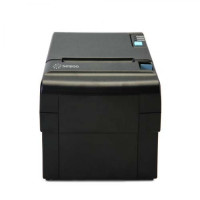


-200x200.jpg "Sewoo SLK-TE213 3-inch Direct Thermal POS Printer")
