0
CART
0
YOUR CART
MaxQ SSDs are becoming a practical choice for users in Bangladesh who want faster system performance without spending too much on storage. Designed for desktops, laptops, office computers, and everyday computing, MaxQ offers SSD solutions with different storage capacities and form factors. Compared to traditional hard disk drives, an SSD can significantly improve boot time, application loading, file access, and overall system responsiveness.
If you are planning to upgrade your computer or replace an older storage drive, MaxQ SSD can be a cost-effective option for improving everyday performance. From compact M.2 drives to standard 2.5-inch SATA SSDs, MaxQ provides storage options for different types of PC builds and user requirements.
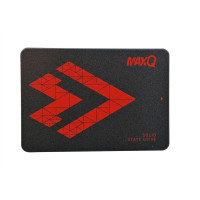
MaxQ 2.5-inch SATA SSDs are suitable for desktops and laptops that use a standard SATA interface. They are a convenient upgrade for systems that still rely on traditional HDD storage. With faster data access and improved responsiveness, these SSDs can make Windows startup, software launching, and general multitasking noticeably smoother.
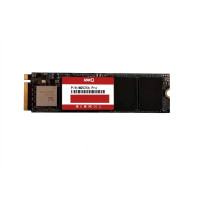
For modern computers with an M.2 slot, MaxQ M.2 SSDs provide a compact storage solution without requiring the space of a traditional 2.5-inch drive. Their small form factor makes them suitable for slim laptops, compact PCs, and newer desktop builds. An M.2 SSD is a good choice for users looking for a clean and space-saving storage upgrade.
MaxQ NVMe SSDs are designed for users who need faster storage performance and quicker data transfer. Using the PCIe interface, NVMe drives can offer significantly higher performance than conventional SATA SSDs. They are suitable for gaming, software development, content creation, multitasking, and other workloads where storage speed matters.
A 128GB SSD can be suitable for basic computing requirements, especially when used as a system drive. It provides enough space for Windows, essential applications, and everyday software while offering a noticeable improvement over an HDD.
The 256GB capacity provides a useful balance between storage space and affordability. It is suitable for office work, study, browsing, software installation, and light gaming. Users upgrading an older PC can consider this capacity for a practical performance boost.
For users who need more room for applications, documents, games, and multimedia files, a 512GB MaxQ SSD can be a versatile option. It works well for general-purpose PCs, gaming systems, and productivity-focused computers.
A 1TB SSD is ideal for users who regularly work with larger files or maintain a sizeable collection of games, applications, photos, and videos. It provides considerably more usable space while retaining the advantages of solid-state storage.
Faster System Startup
Installing Windows on an SSD can reduce startup time and make the computer feel considerably more responsive.
Quicker Application Loading
SSD technology allows programs and files to be accessed faster, helping applications open more smoothly.
Improved Multitasking
Faster storage can contribute to a more responsive experience when switching between multiple applications and handling everyday workloads.
Compact Design
M.2 models offer a space-efficient storage solution for modern laptops and desktop PCs.
Lower Power Consumption
SSDs generally consume less power than traditional mechanical hard drives, making them suitable for laptops and energy-efficient systems.
No Moving Mechanical Parts
Unlike HDDs, SSDs have no spinning platters or mechanical read/write heads, which helps provide silent operation and improved resistance to physical movement.
A MaxQ SSD can be a useful upgrade for gamers who want faster game loading and a more responsive system. While an SSD does not directly increase GPU-based gaming performance, faster storage can reduce loading times and improve overall system responsiveness.
For students, office professionals, freelancers, and home users, upgrading from an HDD to an SSD can make everyday tasks such as starting Windows, opening documents, launching browsers, and running applications feel much faster.
Before purchasing a MaxQ SSD, users should check their computer's available storage interface and supported form factor. A 2.5-inch SATA SSD requires a compatible SATA connection, while an M.2 SSD requires an appropriate M.2 slot. NVMe SSDs also require motherboard or laptop support for the relevant PCIe/NVMe interface.
Checking compatibility before buying helps ensure that the selected MaxQ SSD works properly with the existing system.
MaxQ SSDs can be an attractive option for budget-conscious users who want to move from traditional HDD storage to faster solid-state storage. With different capacities and form factors available, users can select a drive according to their computer configuration, storage requirements, and budget.
Whether you are upgrading an old laptop, assembling an affordable desktop, improving an office PC, or building a gaming computer, a MaxQ SSD can provide a practical combination of speed, storage, and value.
Looking for the MaxQ SSD price in Bangladesh? Explore the latest MaxQ SSD options at Computer Vision BD and choose the right storage solution based on your capacity, interface, performance requirements, and budget. Whether you need an SSD for a laptop upgrade, office PC, gaming setup, or everyday computing, Computer Vision BD offers quality MaxQ storage solutions at competitive prices.
Upgrade from a traditional HDD to a MaxQ SSD and enjoy faster boot times, quicker application loading, improved file access, and a more responsive computing experience. Shop MaxQ SSD from Computer Vision BD today and find the right storage upgrade for your PC or laptop.